
If you’ve ever set up home internet, you’ve probably heard the words router and modem. Many people use these terms as if they mean the same thing, but they actually have different jobs. This can be confusing, especially if you’re buying new internet equipment or trying to fix a slow connection.
People usually search for:
- Router or modem difference
- Do I need a router and a modem?
- Router vs modem
- What does a router do?
- What does a modem do?
- Router or modem for Wi-Fi
The simple answer is that a modem connects your home to your internet service provider (ISP), while a router shares that internet connection with your devices, such as phones, laptops, tablets, and smart TVs.
Whether you’re working from home, studying online, gaming, or streaming videos, understanding the difference between a router and a modem can help you choose the right equipment and solve common internet problems.
In this guide, you’ll learn the meaning, pronunciation, examples, usage, common mistakes, expert tips, and simple explanations in easy English.
Router or Modem – Quick Answer
👉 Router = Shares your internet connection with multiple devices.
👉 Modem = Connects your home or office to your internet service provider.
Simple Rule
- No modem = No internet connection from your ISP.
- No router = Usually only one wired device can use the internet.
Examples
- ✔ My modem connects to the internet cable.
- ✔ My router sends Wi-Fi throughout the house.
- ✔ I replaced my old router for faster Wi-Fi.
- ✔ My ISP provided a modem when I signed up.
Easy Memory Trick
Modem = Meets the internet.
Router = Routes the internet to your devices.
What Does Router or Modem Mean?
A modem receives the internet signal from your ISP and converts it into a connection your home network can use.
A router takes that connection and distributes it to multiple devices through Wi-Fi or Ethernet cables.
Related Terms
- Wi-Fi
- Internet service provider (ISP)
- Ethernet
- Broadband
- Wireless network
- Mesh Wi-Fi
Common Variations
- Wireless router
- Wi-Fi router
- Cable modem
- DSL modem
- Fibre modem
- Modem-router combo
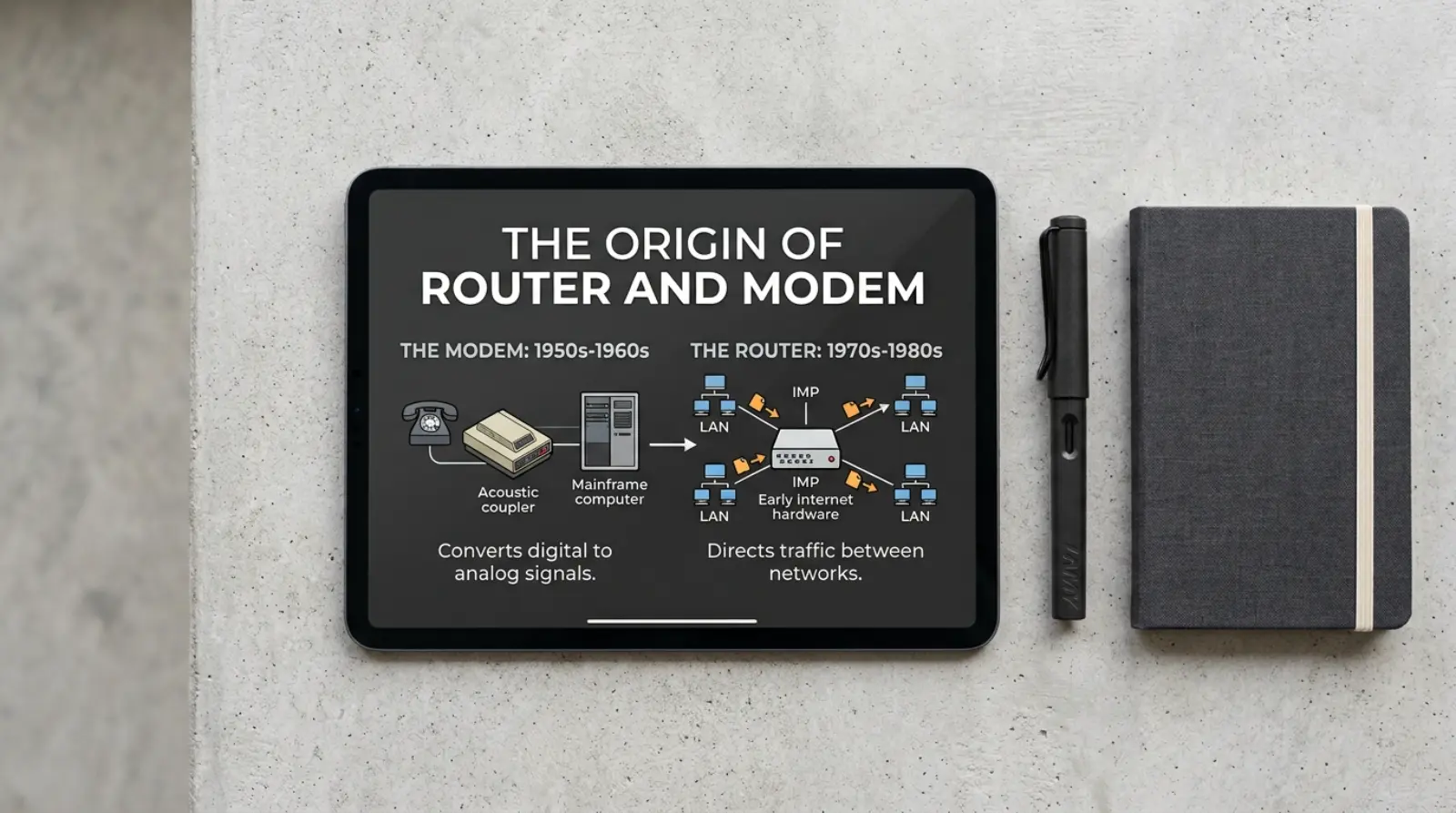
The Origin of Router and Modem
The word modem comes from modulator-demodulator, describing how it converts signals for communication.
The word router comes from the idea of routing, or directing, network traffic between devices.
Today, many homes use a modem-router combo, which combines both functions into one device.
How to Pronounce Router and Modem
| Word | Pronunciation |
|---|---|
| Router | ROW-ter (US), ROO-ter (some regions) |
| Modem | MOH-dem |
Speaking Tip
Say each word slowly:
- Router → ROW-ter
- Modem → MOH-dem
British English vs American English Usage
| Feature | British English | American English | Notes |
|---|---|---|---|
| Router | ✔ Common | ✔ Common | Same meaning |
| Modem | ✔ Common | ✔ Common | Same meaning |
| Wi-Fi usage | Same | Same | Used worldwide |
Which One Should You Use?
Choose a modem if:
- You need to connect to your ISP.
- You’re replacing a faulty modem.
Choose a router if:
- You need Wi-Fi.
- You want multiple devices online at the same time.
- You need better wireless coverage.
Quick Guide
| Situation | Best Device |
|---|---|
| Internet connection from ISP | Modem |
| Home Wi-Fi | Router |
| Large home network | Router |
| New internet setup | Both or a combo device |
Common Mistakes with Router or Modem
Mistake 1
❌ Thinking a router connects directly to the internet.
✔ A router usually needs a modem to access the internet.
Mistake 2
❌ Calling every internet box a router.
✔ Some devices are only modems or modem-router combos.
Mistake 3
❌ Buying a router to fix ISP connection problems.
✔ If the modem has no internet signal, replacing the router won’t help.
Mistake 4
❌ Assuming faster internet always needs a new modem.
✔ Sometimes only the router or Wi-Fi settings need upgrading.
Mistake 5
❌ Forgetting to restart both devices during troubleshooting.
✔ Restarting the modem and router often fixes temporary issues.
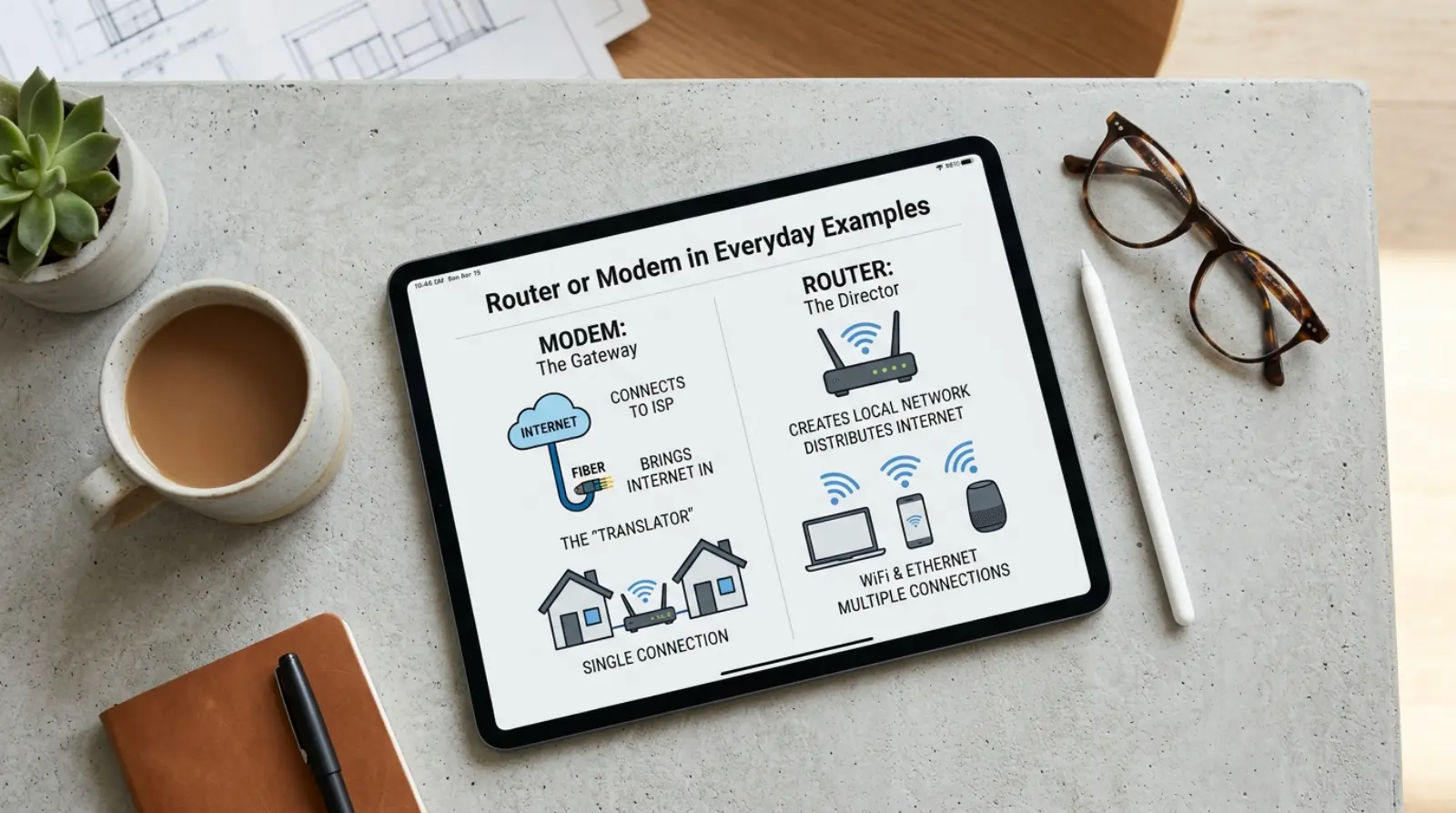
Router or Modem in Everyday Examples
Home
“My modem connects to the cable line, and my router provides Wi-Fi.”
Office
“We upgraded the router to support more employees.”
School
“The teacher explained the difference between a modem and a router.”
Gaming
“A better router reduced lag while gaming.”
Conversation
“Have you tried restarting both the modem and the router?”
Router or Modem in Different Contexts
Home Networking
The modem connects your home to the internet, while the router creates your home network.
Business
Companies use powerful routers to connect many computers securely.
Smart Homes
Smart lights, cameras, speakers, and TVs usually connect through the router’s Wi-Fi.
Google Trends & Usage
Searches for router or modem remain popular because many people upgrade home internet, work remotely, or troubleshoot Wi-Fi issues.
Common searches include:
- Router vs modem
- Do I need both?
- Modem-router combo
- Best router for fibre internet
- Why is my Wi-Fi slow?
These searches are especially common in the US, UK, Canada, Australia, India, and Pakistan.
Comparison Table
| Feature | Router | Modem |
|---|---|---|
| Connects to ISP | No | Yes |
| Creates Wi-Fi | Yes | Usually No |
| Connects multiple devices | Yes | Limited |
| Main purpose | Shares internet | Receives internet |
| Needed for home Wi-Fi | Yes | Yes (or combo device |
Router or Modem in Professional Life
Understanding the difference helps IT professionals, office workers, and business owners:
- Set up office networks.
- Improve Wi-Fi coverage.
- Troubleshoot internet issues.
- Choose the right networking equipment.
Router or Modem for Beginners
Many beginners think these devices are identical because both sit near the internet cable.
Easy Tips
- Remember that the modem brings the internet into your home.
- The router shares that internet with all your devices.
- If you have one box from your ISP, it may be a modem-router combo.
Common Uses
People use routers and modems to:
- Browse the internet
- Stream videos
- Play online games
- Work from home
- Attend online classes
- Connect smart home devices
Simple Trick to Remember Router or Modem
Think of it this way:
- Modem = Front Door (lets the internet enter your home).
- Router = Traffic Manager (sends the internet to every room and device).
This simple picture makes the difference easy to remember.
Expert Tips
- Place your router in a central location for better Wi-Fi coverage.
- Restart your modem and router if the internet stops working.
- Update your router’s firmware for better security and performance.
- Use Ethernet cables for devices that need the fastest and most stable connection.
- Upgrade your router if you have many connected devices.
Related Searches People Also Ask
- What is the difference between a router and a modem?
- Do I need both a router and a modem?
- Can a router work without a modem?
- What is a modem-router combo?
- Which device provides Wi-Fi?
- Why is my internet slow even with a new router?
- Can I replace my ISP’s router?
- Is a modem included with internet service?
- What does a wireless router do?
- How do I know if I need a new modem?
FAQs
Is a router the same as a modem?
No. They perform different functions.
Do I need both?
Most homes need both, unless you use a modem-router combo.
Which device gives Wi-Fi?
The router provides Wi-Fi.
What does a modem do?
It connects your home to your internet service provider.
Can I use a router without a modem?
You can create a local network, but you usually won’t have internet access.
What is a modem-router combo?
It is one device that works as both a modem and a router.
Which should I upgrade first?
If your Wi-Fi is slow, upgrading the router often helps. If your internet plan has changed, you may also need a newer modem.
Can I buy my own router?
Yes. Many people use their own router for better performance and features.
Final Verdict
Both devices are important, but they do different jobs.
- Modem = Connects your home to the internet.
- Router = Shares that internet with all your devices.
For most homes, the best setup is both devices or a modem-router combo supplied by your ISP.
Conclusion
Understanding the difference between a router or modem makes buying and troubleshooting internet equipment much easier. A modem is responsible for bringing the internet into your home, while a router creates your home network and provides Wi-Fi to multiple devices.
The easiest way to remember is: the modem brings the internet in, and the router sends it everywhere. Once you know this simple rule, choosing the right networking equipment becomes much less confusing.

Camila Green is an English language writer who specializes in confusing word comparisons and spelling explanations. She creates simple, beginner-friendly guides on topics like “niece or neice” and other common English mistakes. Her writing focuses on clarity, real-life examples, and easy learning. At VerrsaPick, she helps readers improve their English with practical and engaging content.